Automation
Automation
Automation Configuration
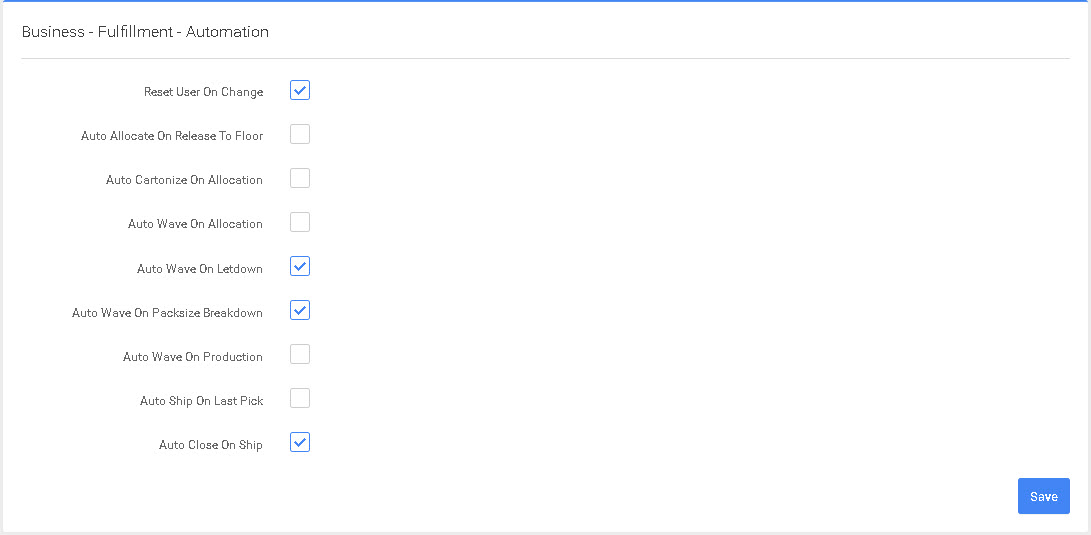
- Reset User On Change - This setting is to reset the assigned user on an order when the order status changes from being picked to rating. This allows the dispatcher to assign the order to a Shipping person.
- Auto Allocate on Release to floor - This is used in smaller Operations and/or ecommerce Warehouses where you have an abundance of Inventory and want orders shipped as the orders arrive. This will cause the order to auto allocate.
- Auto Cartonize on Allocation - This setting puts the order in a cartonized format, this is used only when you are using the cartonization functionality of P4 Warehouse.
- Allow wave on Allocation - This is used in smaller Operations and/or ecommerce Warehouses where you have an abundance of Inventory and want order shipped as the orders arrive. this will cause the pick label to automatically print.
- Auto Wave On Letdown - This will automatically print the pick label once the product letdowns are completed.
- Auto Wave On Packsize Breakdown - This setting will cause the pick label to automatically print after Packsize Breakdown is completed.
- Auto Wave On Production -This will cause a Production order to automatically print the Production pick label in the event a Production order is required to fill a sales order, or a manual Production order is entered.
- Auto Ship On Last Pick - This will cause the order to auto Ship on last pick, this will bypass the Shipping process.
- Auto Close On Ship - This will cause the sales order to move to a closed status once the Shipping process is completed.
For line 8 & 9 this is override in the event you have recount on Ship, recount on Delivery, sign on Ship or sign on Delivery selected in the sales order.
Was this page helpful?