 P4 Software
/
P4 Warehouse
P4 Software
/
P4 Warehouse
P4 Software
/
P4 Warehouse
P4 Software
/
P4 Warehouse
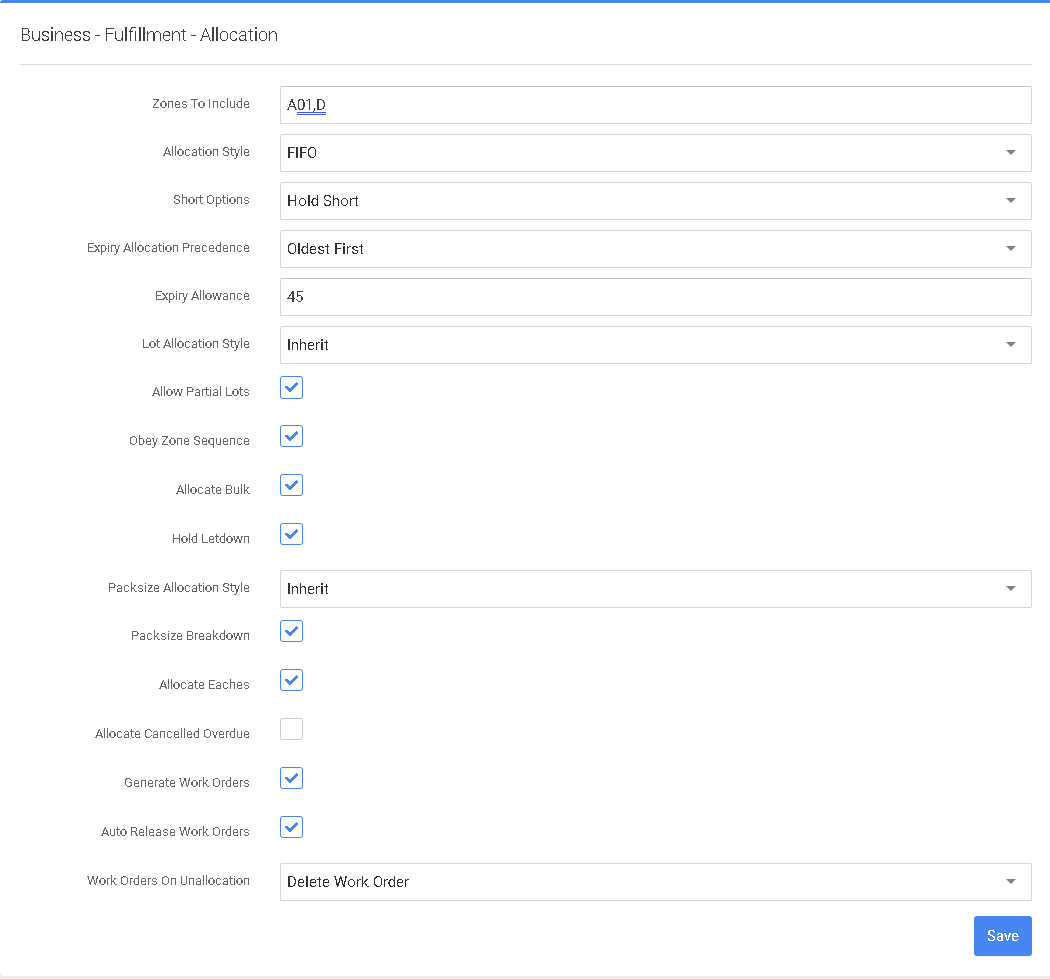
Allocation - This configuration page features: Zones To Include (Comma separated list of Zones to include in Allocation; example A1,B2,C3), Allocation Style (options for Allocation behavior; FIFO=First in, First out; LIFO=Last in, First out; BinName=Based on alphanumeric bin sorting; Custom=Alphanumeric sorting of SequenceNumber value of the bin: default FIFO), Short Options (options for short behavior; ShipShort will allow Shipping of shorted orders; HoldShort will not release an order for Picking but reserves the stock; default: Ship Short), Allocate Bulk (include LPNs in Pickage Zones during Allocation to pick from; Yes/No toggle, default: No), Expiry Allowance (minimum number of days to be allowed on an Expiry Product to be allocated, this option is overridden by a Customer setting; default: 45) and Allocate Eaches (whether to allow allocating eaches for Packsize controlled items; Yes/No toggle, default: Yes).
After modifying any entry, select the “Save” button to the lower right.
Was this page helpful?