On this screen you will configure the Data Entry defaults.
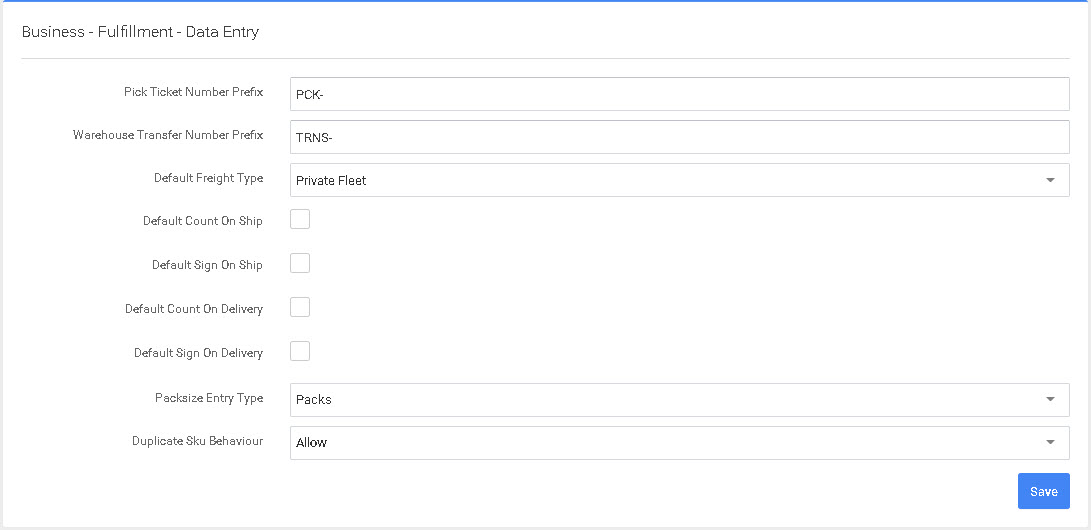
- Pick Ticket Number Prefix - This is the prefix that will display in front of your sales order numbers. (PCK-0001)
- Warehouse Transfer Number Prefix - This is the prefix that will display in front of your Transfer order numbers. (TRNS-0001)
- Default Freight Type - This will be the default freight type. If you mostly Ship FedEx or UPS here you would select Small Parcel. This is the default however at the order level you can select the correct Shipping method.
- Default Count on Ship - This is to require a recount of the product prior to completing the Shipping process.
- Default Sign on Ship - This will cause the order to require a signature on Shipping and allow a Photo to be captured of the product prior to Shipping.
- Default Count on Delivery - This will require the Delivery driver to recount each pallet or box on Delivery.
- Default Sign on Delivery - This will require the Delivery driver to require a Customer signature on Delivery. Also, a Photo can be captured in the Delivery process.
- Packsize Entry type is Packs or eaches, this determines the default label to print depending on the type of Warehouse you operate.
- Duplicate Sku Value - This determines if duplicate sku's re allowed on an order. This is often set to "Prevent" to reduce the chance of double Data Entry. This is extremely useful when keying large orders.
 P4 Software
/
P4 Warehouse
P4 Software
/
P4 Warehouse