Product Bundles
Product Bundles
P4 Warehouse allows for product bundles. An example of a product bundle would be a sales promotion of "buy a Thermal Printer and get 5 rolls of ribbons included". In the order process, the salesperson simply enters the promotion SKU into the ordering system. At this point the WMS understands that it needs to pick various Products and quantities to complete the order. This reduces the opportunity for the salesperson to make a keying error.
Subcomponents must be created before the Product Bundle can be created.
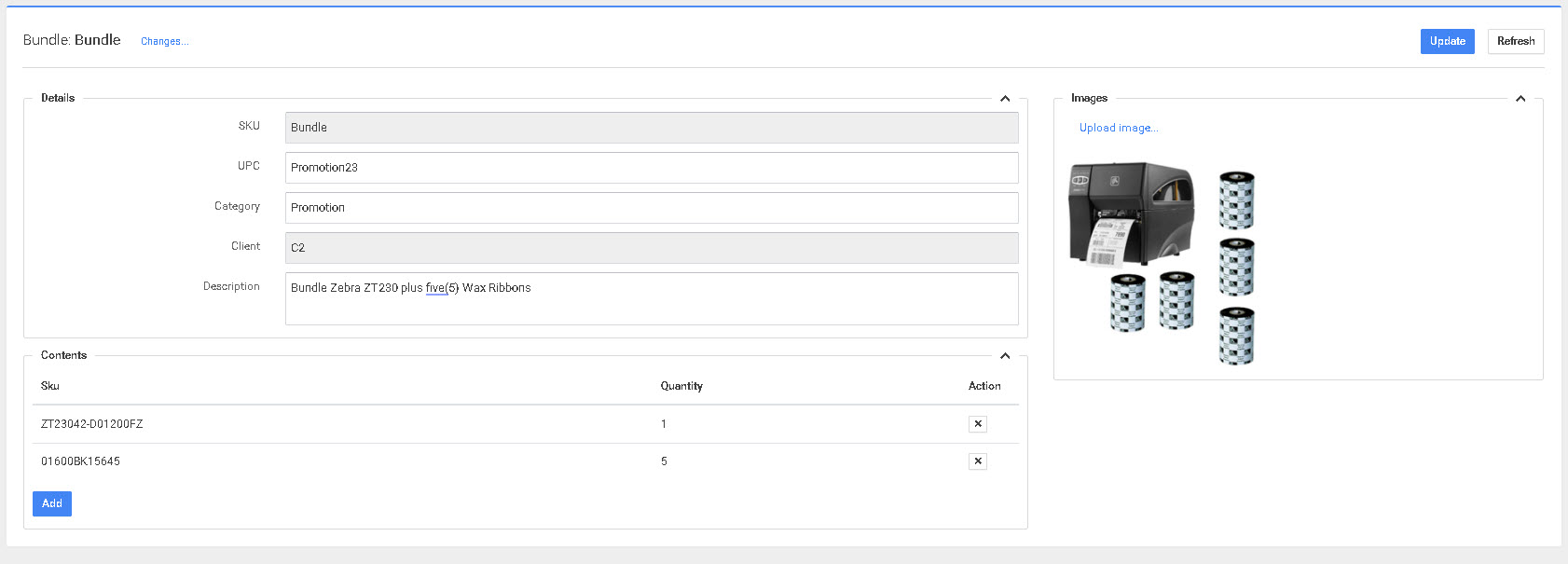
In the image above, P4 Warehouse will send a picker to pick 1 printer and five (5) rolls of wax ribbon to complete the order. The two (2) line could be hand keyed into the sales order manually however the Product Bundle feature reduces the chance of error. If you are using SAP B1 this is called a sales kit.
Remember a product bundle and Production are two (2) different processes.
Production is when you convert one (1) or more Products into a completely new SKU.
Product Bundle vs. BOM (Bill of Materials)
| Product Bundle | BOM (Bill of Materials) |
|---|---|
| Purpose: Fulfillment/Picking | Purpose: Production/manufacturing |
| Behavior: Explodes to component pick lines | Behavior: Consumes components, creates finished good |
| Inventory: Tracked at component level only | Inventory: Components consumed, new SKU Inventory created |
| Pick Ticket: Shows individual components | Work Order: Shows components to assemble |
| Example: Printer + 5 ribbons promotion | Example: Assembling raw materials into finished product |
| Use Case: Sales kits, gift sets, promotional bundles | Use Case: Manufacturing, assembly, kitting Production |
Overview
P4's Product Bundle feature enables defining multi-component bundles as single sellable SKUs. One bundle SKU on the order → P4 automatically explodes it into every individual component pick line. Pickers never see the bundle SKU, only the exact components to pick. This eliminates manual errors and ensures complete shipments every time.
Bundling is included standard with no additional licensing fees.
Core Functionality
Automatic Explosion — Bundle SKUs generate separate pick lines for each component in real-time as orders arrive, requiring no manual intervention.
Component-Level Tracking — Inventory is tracked only at the component level. The bundle SKU itself carries no stock balance — it functions purely as a Fulfillment instruction.
Short-Ship Prevention — P4 validates all components are available in sufficient quantity before Releasing orders. If any component is short, the entire bundle order is held.
A short shipment is not possible — the system prevents Releasing a partial bundle. If any single component is unavailable, the entire bundle order will be held until stock is available.
Per-Client Isolation — In 3PL environments, each client's bundle definitions remain completely independent, preventing cross-account mix-ups.
Key Capabilities
- Auto pick ticket explosion
- Per-client bundle definitions
- Component-level Inventory management
- Short-Ship prevention
- Bulk import/export functionality
- Wave and batch Picking integration
- RF scanner-based Picking workflows
Configuration Steps
Creating a Product Bundle
- Navigate to Setup → Products → Product Bundles
- Click Create New Bundle
- Enter the Bundle SKU (the sellable SKU that customers will order)
- Add each component:
- Select the Component SKU from your product list
- Enter the Quantity required per bundle
- Repeat for all components
- Save the bundle definition
Components must already exist as Products in P4 Warehouse before they can be added to a bundle.
Bulk Import via Spreadsheet
For creating or updating many bundles at once:
- Navigate to Setup → Products → Product Bundles
- Click Import (or Bulk Upload)
- Download the template spreadsheet
- Fill in your bundle definitions:
- Column A: Bundle SKU
- Column B: Component SKU
- Column C: Quantity per bundle
- Repeat rows for each component in each bundle
- Upload the completed spreadsheet
- P4 validates and creates/updates all bundle definitions
Template Example:
| Bundle SKU | Component SKU | Quantity |
|---|---|---|
| PROMO-PRINTER-01 | PRINTER-ZD421 | 1 |
| PROMO-PRINTER-01 | RIBBON-WAX-4X6 | 5 |
| DINING-SET-OAK | TABLE-TOP-OAK | 1 |
| DINING-SET-OAK | TABLE-BASE-01 | 1 |
| DINING-SET-OAK | CHAIR-OAK-BLK | 4 |
Editing or Deactivating Bundles
- To edit: Open the bundle definition, modify component quantities or add/remove components, and save.
- To deactivate: Remove all components or mark the bundle SKU as inactive. Existing orders will complete, but new orders cannot use the bundle.
Four-Step Workflow
- Define the bundle — Navigate to Setup → Products → Product Bundles and create the bundle definition (manually or via spreadsheet upload).
- Order arrives — A Customer order containing the bundle SKU arrives via EDI, e-commerce, or manual entry.
- Automatic explosion — P4 explodes the bundle into individual component pick lines and validates availability of all components.
- Fulfillment — Pickers fulfill the component lines; complete bundles Ship without partial shipments.
Real-World Applications
| Use Case | Example |
|---|---|
| Furniture sets | Dining room bundle (table base, tabletop, and four chairs) |
| Electronics kits | Charging cradle with cables and accessories |
| Gift / promotional packs | Seasonal skincare sets |
| Food variety packs | Snack assortments |
Best Practices
Use descriptive bundle SKUs — Choose bundle SKUs that clearly indicate they are bundles (e.g., PROMO-, KIT-, BUNDLE- prefixes) to avoid confusion with regular Products.
Validate component availability regularly — Run Inventory Reports on bundle components to identify potential stock-outs before they block orders.
Document seasonal bundles — If you create promotional bundles for specific seasons or campaigns, include the campaign name or date range in the SKU or description for easy identification and cleanup.
Test before go-live — Create a test bundle with low-value components and run a complete order cycle (create order → allocate → pick → Ship) to verify the workflow before deploying to Production.
Monitor short-Ship holds — Set up alerts or daily Reports to flag bundle orders held due to component shortages, so Warehouse managers can prioritize replenishment.
Coordinate with sales and marketing — Ensure your sales team and e-commerce system use the correct bundle SKUs. A typo in the order entry system can cause the bundle explosion to fail.
Leverage bulk import for updates — When promotional bundles change frequently (seasonal campaigns, limited-time offers), maintain a master spreadsheet and re-import to update definitions quickly.
Frequently Asked Questions
At what level is Inventory tracked?
Component-level only. Bundles have no separate stock balance — the bundle SKU is a Fulfillment instruction, not an Inventory item.
Can I import bundle definitions in bulk?
Yes. Use the spreadsheet upload option in Setup → Products → Product Bundles to create or update multiple definitions simultaneously.
What happens when a component is out of stock?
Orders are held and flagged. Warehouse managers can see exactly which component is blocking Fulfillment.
Can a single component appear in multiple bundles?
Yes. A component can be part of multiple bundle definitions. P4 tracks consolidated demand across all bundles.
Do bundles work with wave and batch Picking?
Yes. Bundle component lines integrate seamlessly with standard wave and batch Picking Operations.
When invoicing in P4 Books, does the Customer see the bundle SKU or components?
The invoice shows the bundle SKU (what the Customer ordered). The pick ticket shows the components (what the Warehouse picked). Inventory is consumed at the component level. This ensures clean Customer-facing documents while maintaining accurate Warehouse Operations.
How does P4 handle components with multiple packsizes?
P4's Allocation engine selects the optimal Packsize for each component based on your Picking strategy and available Inventory. For example, if a bundle requires 4 chairs and you have a 4-pack available, the picker can fulfill it with one pick instead of four individual units. The system automatically chooses the most efficient Packsize combination.
Can I use the same component in multiple bundles?
Yes. A single component SKU can appear in any number of bundle definitions. For example, a standard power cable might be included in five different electronics kits. P4 tracks total component demand across all open bundle orders, giving you a consolidated view of Inventory requirements.
What happens during Allocation if I have multiple bundles on the same order?
P4 validates all components for all bundles before Releasing the order. If you have sufficient Inventory to fulfill Bundle A but not Bundle B on the same order, the entire order is held until all bundle requirements can be met. This prevents partial shipments and ensures order integrity.
Troubleshooting
Problem: Bundle order is not exploding into component lines
- Cause: Bundle SKU may not be properly defined in Setup → Products → Product Bundles
- Solution: Verify the bundle definition exists and has at least one active component
Problem: Order is held with "Component unavailable" error
- Cause: One or more components in the bundle have insufficient on-hand Inventory
- Solution: Check the order detail screen to see which component(s) are short. Replenish stock, substitute with an alternate component, or adjust the bundle definition
Problem: Picker sees the bundle SKU on their device instead of components
- Cause: Bundle explosion may have failed, or the order was created before the bundle definition was saved
- Solution: Cancel and re-create the pick ticket. If the issue persists, verify the bundle is properly configured and contact Support
Problem: Component quantity is incorrect on pick ticket
- Cause: Bundle definition may have the wrong quantity for that component, or multiple bundles on the same order are being combined
- Solution: Review the bundle definition. If the order contains multiple bundle units (e.g., 3× DINING-SET-OAK), verify that P4 multiplied component quantities correctly (3 bundles × 4 chairs = 12 chairs)
Problem: Customer received incomplete bundle shipment
- Cause: Short-Ship prevention may be disabled, or components were picked separately and not validated as a complete set
- Solution: Enable short-Ship prevention in System Configuration → Fulfillment. Review your Shipping process to ensure bundle components are packed together and validated before dispatch
Related Features
BOM - Bill of Materials — Production module for manufacturing finished goods from component materials. Different from Product Bundles, which are for Fulfillment only.
Packsize — P4's 5-level unit of measure system that determines how components are picked (each, inner pack, case, pallet, container).
Allocation — Inventory reservation system that validates component availability before Releasing bundle orders to pick.
Waving — Batch Picking process that includes bundle component lines alongside regular order lines.
3PL Billing Profiles — For 3PL operators: configure per-client bundle definitions and bill for kitting labor as a value-added service.
See Also
Was this page helpful?