 P4 Software
/
logisticaHQ Client Portal
P4 Software
/
logisticaHQ Client Portal
P4 Software
/
logisticaHQ Client Portal
P4 Software
/
logisticaHQ Client Portal
The Expiry report lists your stock that carries an expiry date and tells you which of it has expired or is about to. Use it to answer "what is about to expire?" It is for any user whose warehouse has turned on View reports.
You need the View reports switch. See Inventory and reports.
Reports > Expiry
The subtitle reads "Your stock that carries an expiry date, bin- and LPN-stored."
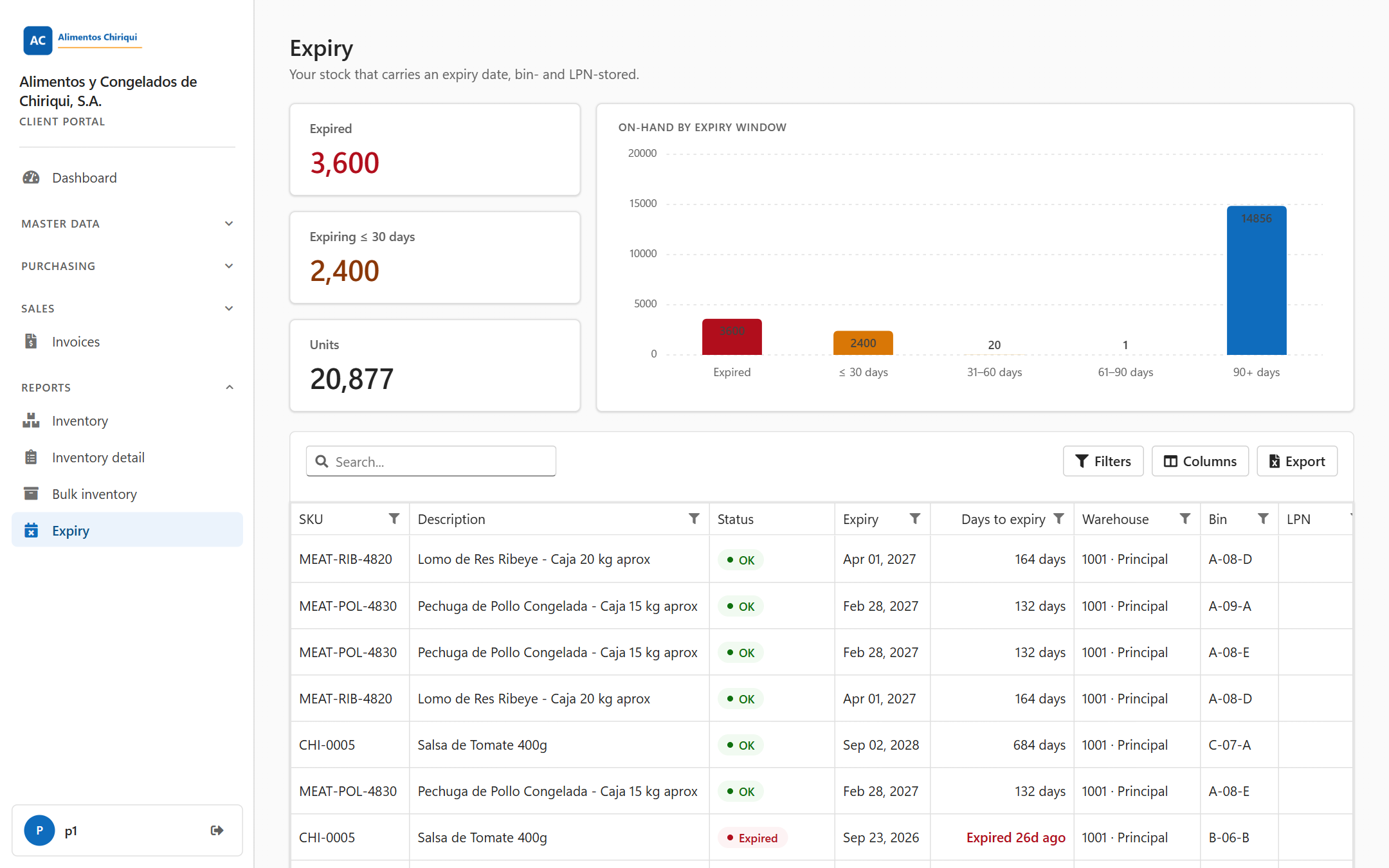
The Expiry report.
Above the table you see three tiles and a chart. They appear only when at least one line has an expiry date; if there is none, there is no band at all (not zeros).
| Tile | What it counts |
| Expired | Units whose expiry date is before today (red number). |
| Expiring ≤ 30 days | Units that expire from today up to 30 days from today, both days included (amber number). Units that have already expired are not counted here. |
| Units | All the units that carry an expiry date. This is not your total stock: units without an expiry date are not counted. |
The tiles count units (the quantity), not rows. For example, a line of 100 units that expired last week and a line of 40 units that expires in ten days give Expired 100 and Expiring ≤ 30 days 40. The numbers are whole numbers with a comma for thousands.
The chart is titled On-hand by expiry window. It is a column chart with one column for each time window, in date order, and the columns show units (the series is named Units). A window with no units is left out.
| Window | Which units | Colour |
| Expired | Expiry date before today | Red |
| ≤ 30 days | Expire today up to 30 days from today | Amber |
| 31–60 days | Expire in 31 to 60 days | Light amber |
| 61–90 days | Expire in 61 to 90 days | Light blue |
| 90+ days | Expire in more than 90 days | Blue |
| Column | What it means |
| SKU | The product's SKU. |
| Description | The product description. |
| Status | A coloured label: Expired, Expiring soon or OK. See the table below. |
| Expiry | The expiry date, for example Sep 24, 2026. |
| Days to expiry | How many days are left, written as shown below. |
| Warehouse | The warehouse, shown as code, a dot and name (for example 1001 · Main warehouse). |
| Bin | The bin code. For stock on an LPN it is the bin the LPN is in. |
| LPN | The LPN code. Empty when the stock sits loose in a bin. |
| Qty | The quantity with that expiry date, with two decimals, aligned to the right. |
| UoM | The product's unit of measure. |
There are no Lot or Serial columns here. For those, use the Inventory detail report. The cells are plain text, not links. Empty cells are left blank.
| Status | Colour | When |
| Expired | Red | The expiry date is before today. |
| Expiring soon | Amber | The expiry date is today, or up to 30 days from today. |
| OK | Green | The expiry date is more than 30 days from today. |
The example below assumes today is Sep 24, 2026.
| Expiry date | Days to expiry shows | Status |
| Sep 19, 2026 | Expired 5d ago (bold, red) | Expired |
| Sep 24, 2026 | Today (bold, amber) | Expiring soon |
| Sep 25, 2026 | 1 day | Expiring soon |
| Oct 24, 2026 | 30 days | Expiring soon |
| Oct 25, 2026 | 31 days | OK |
| Message or situation | What it means | What to do |
| "You don't have access to this section." | Your user does not have the View reports switch. | Ask your warehouse to turn it on. |
| A spinner and no toolbar | The report is still loading. | Wait a moment. |
| An empty report | There are no lines for you, or your search or filters match nothing, or the report could not be loaded. The portal shows no error message in that case. | Click Clear filters. If you expect data, reload the page. If it stays empty, tell your warehouse. |
Was this page helpful?