 P4 Software
/
logisticaHQ Client Portal
P4 Software
/
logisticaHQ Client Portal
P4 Software
/
logisticaHQ Client Portal
P4 Software
/
logisticaHQ Client Portal
The Bulk Inventory report lists the stock that is stored on LPNs (pallets, cartons and other labelled containers), by LPN. Use it to answer "what is on each pallet or box?" It is for any user whose warehouse has turned on View reports.
You need the View reports switch. See Inventory and reports.
Reports > Bulk Inventory
The subtitle reads "Your stock stored on license plates (pallets/cartons), by LPN." Here "license plates" means the same as LPN.
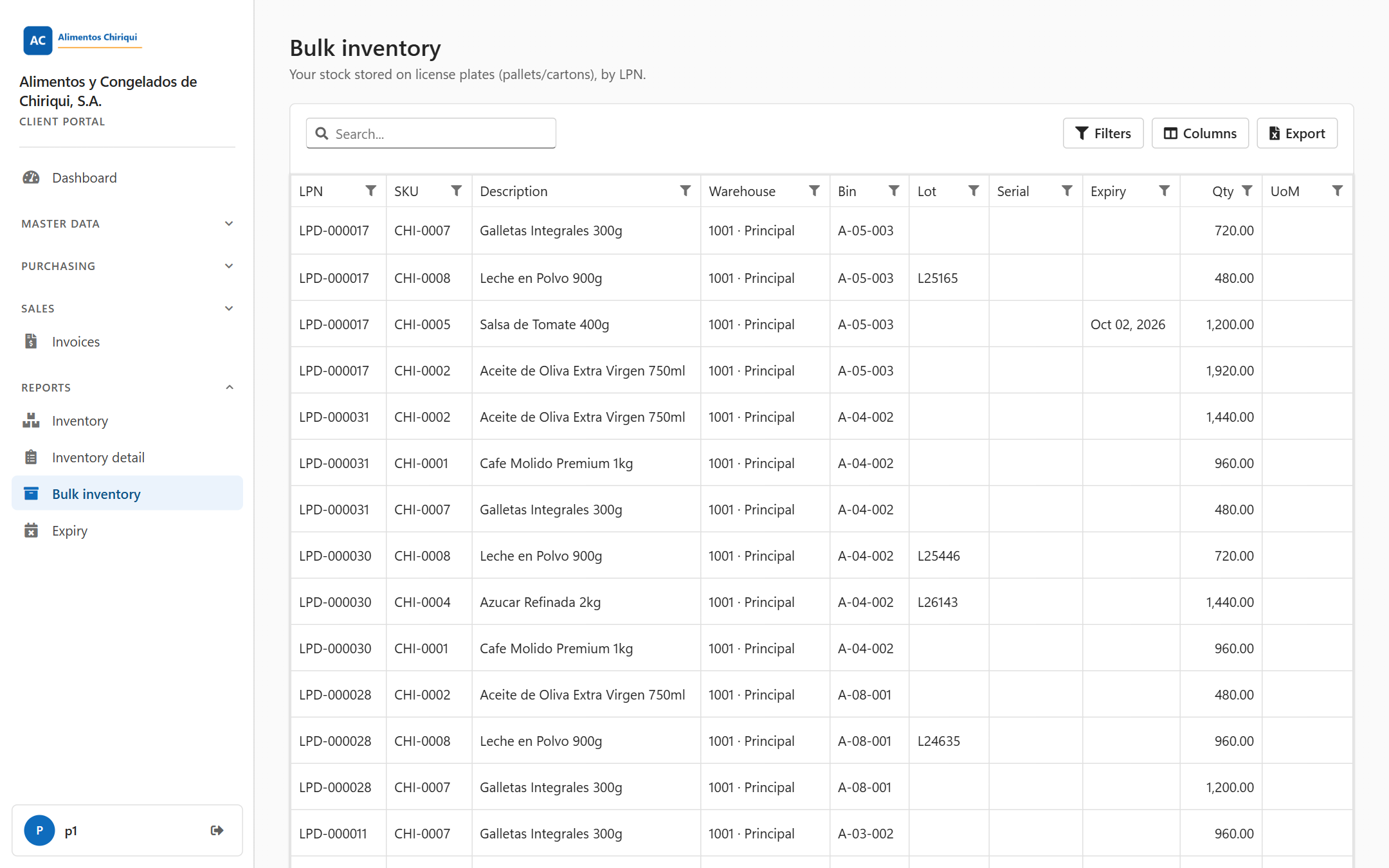
The Bulk Inventory report.
The ten columns are the same as in the Inventory detail report, but LPN comes first.
| Column | What it means |
| LPN | The LPN code. |
| SKU | The product's SKU. |
| Description | The product description. |
| Warehouse | The warehouse, shown as code, a dot and name (for example 1001 · Main warehouse). It is empty if the LPN is not in a bin yet. |
| Bin | The bin the LPN is in. It is empty if the LPN is not in a bin yet. |
| Lot | The lot number. Empty when the line has no lot. |
| Serial | The serial number. Empty when the line has no serial number. |
| Expiry | The expiry date, for example Sep 24, 2026. Empty when the line has no expiry date. |
| Qty | The quantity of that line, with two decimals, aligned to the right. |
| UoM | The product's unit of measure. |
Empty cells are left blank. None of the columns is hidden at first. The cells are plain text, not links.
Unlike the Inventory list, this report does not leave out lines with a quantity of 0, so a line with Qty 0 may appear.
To find one pallet or box, type its LPN code in the search box, or open Filters and type it under LPN.
| Message or situation | What it means | What to do |
| "You don't have access to this section." | Your user does not have the View reports switch. | Ask your warehouse to turn it on. |
| A spinner and no toolbar | The report is still loading. | Wait a moment. |
| An empty report | There are no lines for you, or your search or filters match nothing, or the report could not be loaded. The portal shows no error message in that case. | Click Clear filters. If you expect data, reload the page. If it stays empty, tell your warehouse. |
Was this page helpful?