 P4 Software
/
logisticaHQ Client Portal
P4 Software
/
logisticaHQ Client Portal
P4 Software
/
logisticaHQ Client Portal
P4 Software
/
logisticaHQ Client Portal
Every sales order and purchase order has a state. This page explains each state you can see, in plain words, which stage card counts it, and whether you can still change the order in the portal. The state is set by the warehouse's work, never by you.
The state appears as a coloured label in the State column of the list, in the preview panel, and on the order's page. The table follows the usual path of an order, from placing it to closing it. Not every order goes through every state.
| State | What it means | Stage card | Can you still change the order? |
| Draft | The order exists, but the warehouse has not released it yet. Every order you place in the portal starts here. | All open | Yes, unless it is on a truck load or came from an integration. |
| Unallocated | The warehouse has released the order, but no stock is reserved for it yet. | Waiting for stock | Yes, unless it is on a truck load or came from an integration. |
| Held Short | There was not enough stock to cover the whole order, so it is on hold. Send more stock, or change the order with your warehouse. | Waiting for stock | No. Contact your warehouse. |
| Pending Production | The order is waiting for the warehouse to make the items, for example a kit or an assembly. | Waiting for stock | No. Contact your warehouse. |
| Pending Packsize Breakdown | The warehouse must break a pack into smaller units before it can pick. | Waiting for stock | No. Contact your warehouse. |
| Ready To Pick | Stock is reserved and the order is waiting to be picked. | In progress | No. Contact your warehouse. |
| Pending Letdown | The warehouse must bring stock down from reserve storage to the picking area. | In progress | No. Contact your warehouse. |
| Waved | The order is part of a pick wave, a group of orders picked together. | In progress | No. Contact your warehouse. |
| Being Picked | Picking has started. | In progress | No. Contact your warehouse. |
| Pending Qc | The order is picked and waits for a quality check before it ships. | In progress | No. Contact your warehouse. |
| Qc Hold | A quality check put the order on hold. | All open | No. Contact your warehouse. |
| Rating | Picking is finished and the order is being prepared for shipping. | Ready to ship | No. Contact your warehouse. |
| Pending Ship Count | Waiting for the count at shipping. | Ready to ship | No. Contact your warehouse. |
| Pending Driver Signature | For a delivery in the warehouse's own trucks: waiting for the driver's signature when the order leaves. | Ready to ship | No. Contact your warehouse. |
| Shipped | The order has left the warehouse. It stays on Sales orders until it is closed. | Shipped today on the day it ships | No. Contact your warehouse. |
| Pending Delivery Signature | For a delivery in the warehouse's own trucks: waiting for your customer's signature on delivery. | None | No. Contact your warehouse. |
| Pending Delivery Count | For a delivery in the warehouse's own trucks: waiting for the count at delivery. | None | No. Contact your warehouse. |
| Suspended | The warehouse has paused the order. Nothing moves until it is unsuspended. | All open | No. Contact your warehouse. |
| Closed | The order is finished. It moves to Closed Sales orders. | None (the closed list has no cards) | No. Contact your warehouse. |
"Can you still change the order?" means changing it yourself in the portal, as described in Changing an order. For every state where the answer is no, the warehouse can still adjust the order on its side. The Late card counts, from any of these states, the orders that have not shipped and whose required date has passed. What the preview panel and the order's page say will happen next is listed in Viewing your sales orders.
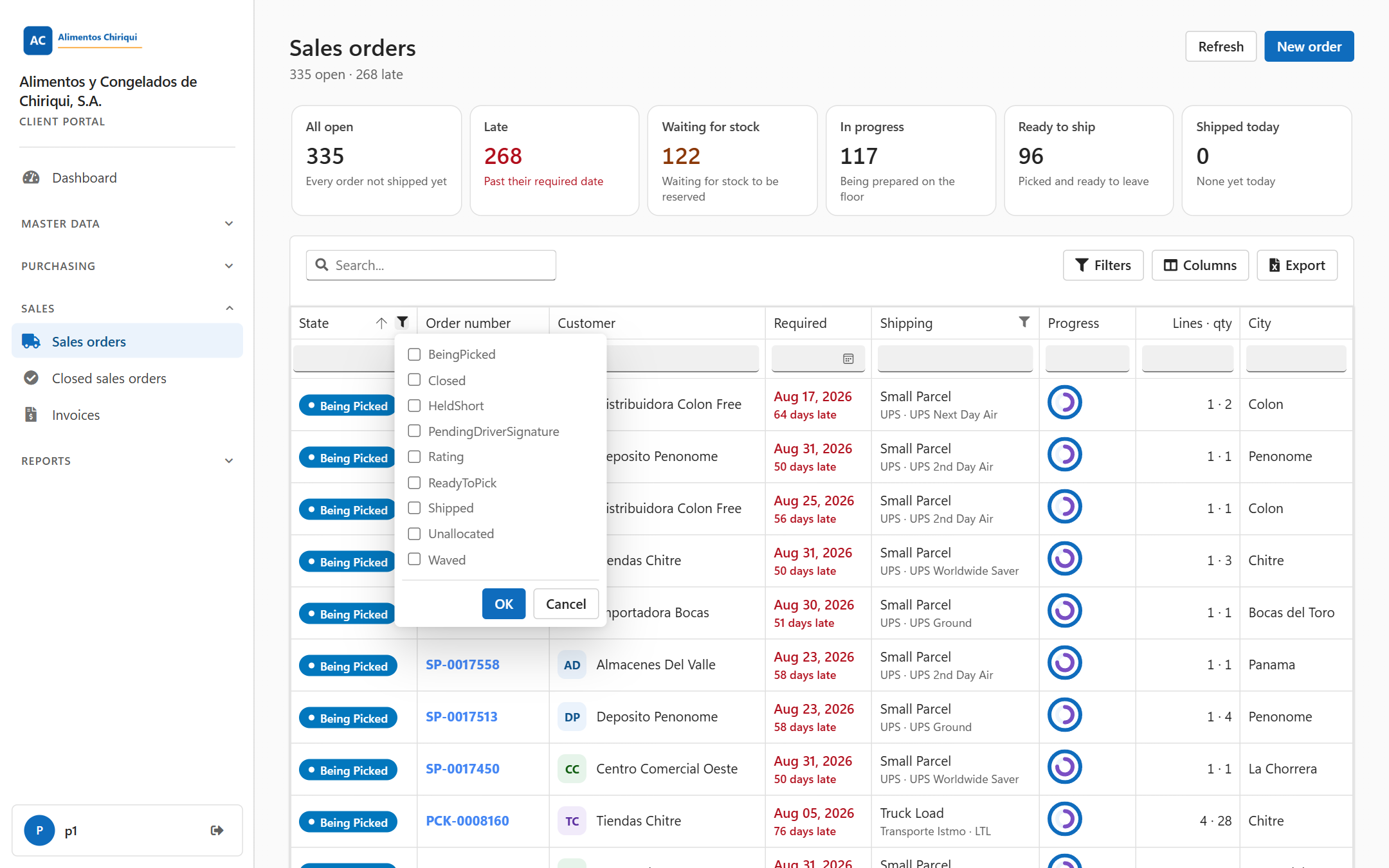
The State filter lists the states your orders have.
| State | What it means | Stage card | Can you still change the purchase order? |
| Draft | The warehouse has not released the purchase order to receiving yet. Every purchase order you submit in the portal starts here. | Draft | Yes, if you have the Create Purchase orders switch. |
| Not Received | The warehouse has released the purchase order, and nothing has been received yet. | Not received | Yes, if you have the Create Purchase orders switch. |
| Partially Received | The warehouse has received part of the goods. | Partially received | No. Contact your warehouse. |
| Received | Receiving is complete. The purchase order stays on Purchase orders until it is closed. | Received | No. Contact your warehouse. |
| Closed | The purchase order is finished. It moves to Closed Purchase orders. | Closed (on the closed list) | No. Contact your warehouse. |
A purchase order that is still Draft, Not Received or Partially Received after its required date is shown as late. See Viewing your purchase orders and Creating a purchase order.
Was this page helpful?