 P4 Software
/
logisticaHQ Client Portal
P4 Software
/
logisticaHQ Client Portal
P4 Software
/
logisticaHQ Client Portal
P4 Software
/
logisticaHQ Client Portal
Three read-only pages show the details behind a row of the Inventory list: one for a product, one for a bin and one for an LPN. They let you follow your stock from a product to the places it is stored and back. They are for any user whose warehouse has turned on View Inventory. You cannot change anything on these pages.
These pages have no menu entry. You open them by clicking a link:
| Page | Click this | Where you find it |
| Product page | A SKU | In the Inventory list, or in the Contents table of a bin or LPN page |
| Bin page | A bin code | In the Inventory list, in the On hand table of a product page, or in the Location card of an LPN page |
| LPN page | An LPN code | In the Inventory list, in the On hand table of a product page, or in the Contents table of a bin page |
The Reports menu group stays open while you are on one of these pages. At the top of each page, Back to Inventory (with a left arrow) returns you to the Inventory list. While a page loads you see a small spinner and the word "Loading...".
The page title is the product's SKU and the line under it is the product description. Three cards show the product data, and a table shows where it is stored. Any empty value is shown as a dash (—).
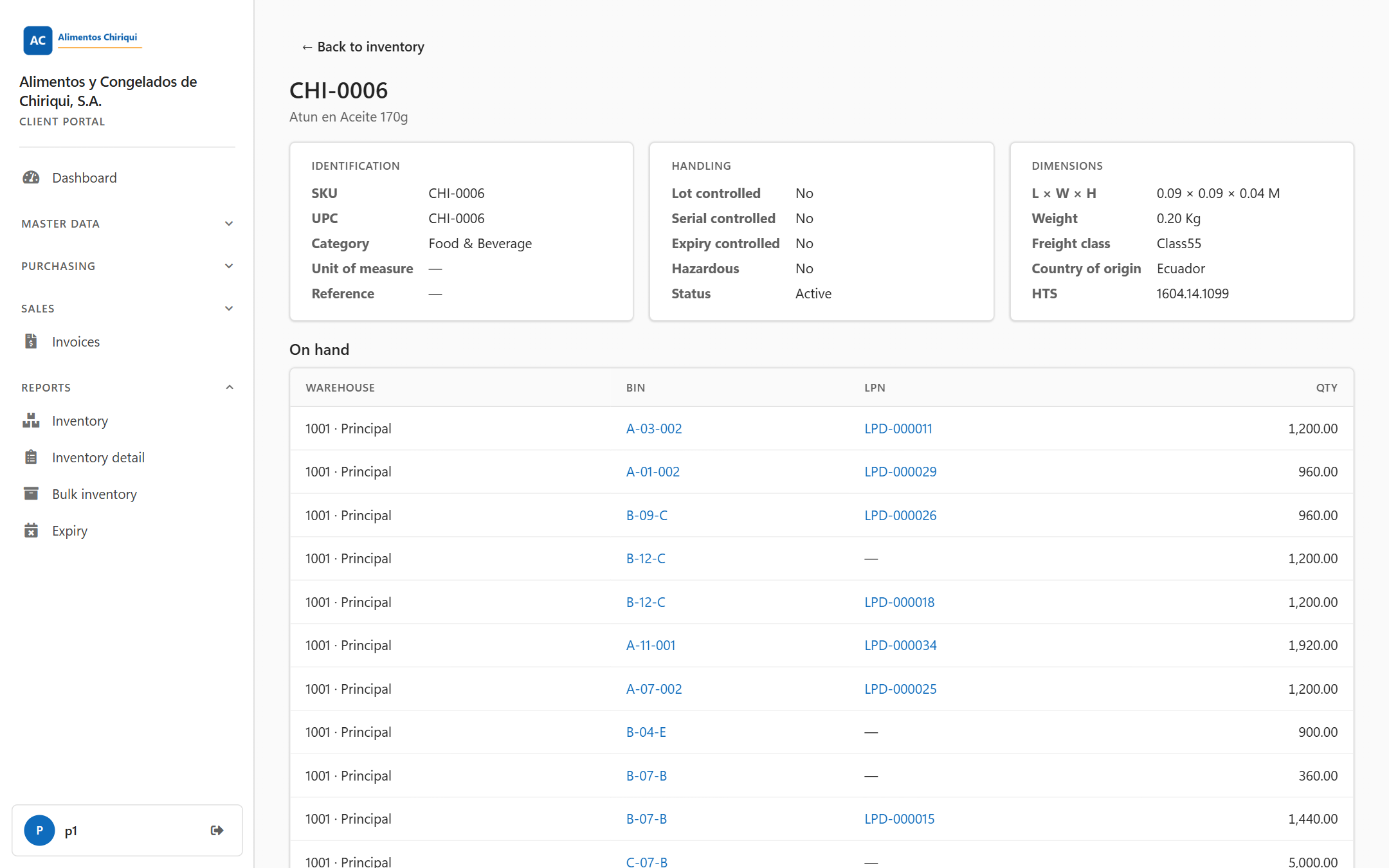
A product page.
| Field | What it means |
| SKU | The product's SKU. |
| UPC | The product's UPC barcode number. |
| Category | The product category. |
| Unit of measure | The unit the product is counted in. |
| Reference | The product's reference number. |
| Field | What it means |
| Lot controlled | Yes if the warehouse tracks this product by lot number, otherwise No. |
| Serial controlled | Yes if each unit has its own serial number, otherwise No. |
| Expiry controlled | Yes if the product carries an expiry date, otherwise No. |
| Hazardous | Yes if the product is marked as hazardous, otherwise No. |
| Status | Active or Discontinued. |
| Field | What it means |
| L × W × H | Length, width and height, each with two decimals and followed by the length unit. A side that is not set shows a dash. If none is set, the whole line is a dash. |
| Weight | The weight with two decimals and its unit, or a dash if it is not set. |
| Freight class | The freight class used for shipping. |
| Country of origin | The country where the product comes from. |
| HTS | The HTS code (customs tariff code) of the product. |
Under the heading On hand, a table lists every place this product is stored with a quantity above 0:
| Column | What it means |
| Warehouse | The warehouse, shown as the code, a dot and the name (for example 1001 · Main warehouse). |
| Bin | The bin code. Click it to open the bin page. For stock on an LPN it is the bin the LPN is in. |
| LPN | The LPN code. Click it to open the LPN page. A dash means the stock sits loose in a bin. |
| Qty | The quantity on hand, with two decimals, aligned to the right. |
If the product has no stock, the table is replaced by "No on-hand stock for this product."
This page is for looking only. To change product data, use Products if your warehouse has given you access.
The page title is Bin followed by the bin code, for example Bin A-01-02. The subtitle gives the total, for example "150.00 units across 3 line(s)." The first number is the total quantity of all the rows in the Contents table. The second is the number of rows.
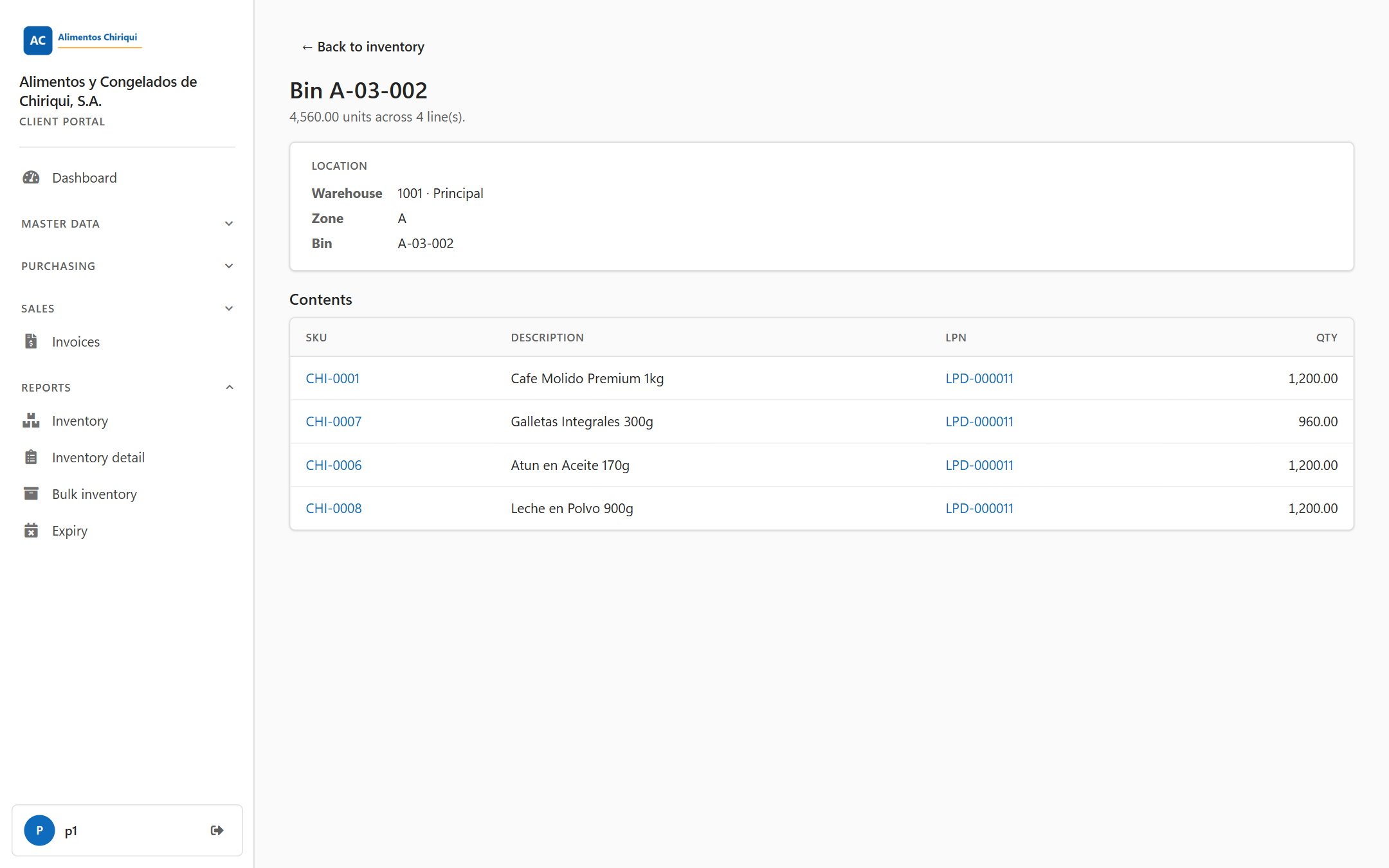
A bin page.
| Field | What it means |
| Warehouse | The warehouse the bin is in, shown as code and name, or a dash if it is not known. |
| Zone | The zone code of the bin, or a dash if it has none. |
| Bin | The bin code. |
The Contents table lists your stock in this bin. It includes stock placed straight in the bin and stock on LPNs that sit in the bin. Only quantities above 0 are listed.
| Column | What it means |
| SKU | The product's SKU. Click it to open the product page. |
| Description | The product description. |
| LPN | The LPN the stock is on. Click it to open the LPN page. A dash means the stock sits loose in the bin. |
| Qty | The quantity on hand, with two decimals, aligned to the right. |
The page title is LPN followed by the LPN code. The subtitle has the same form as on the bin page, for example "40.00 units across 2 line(s)."
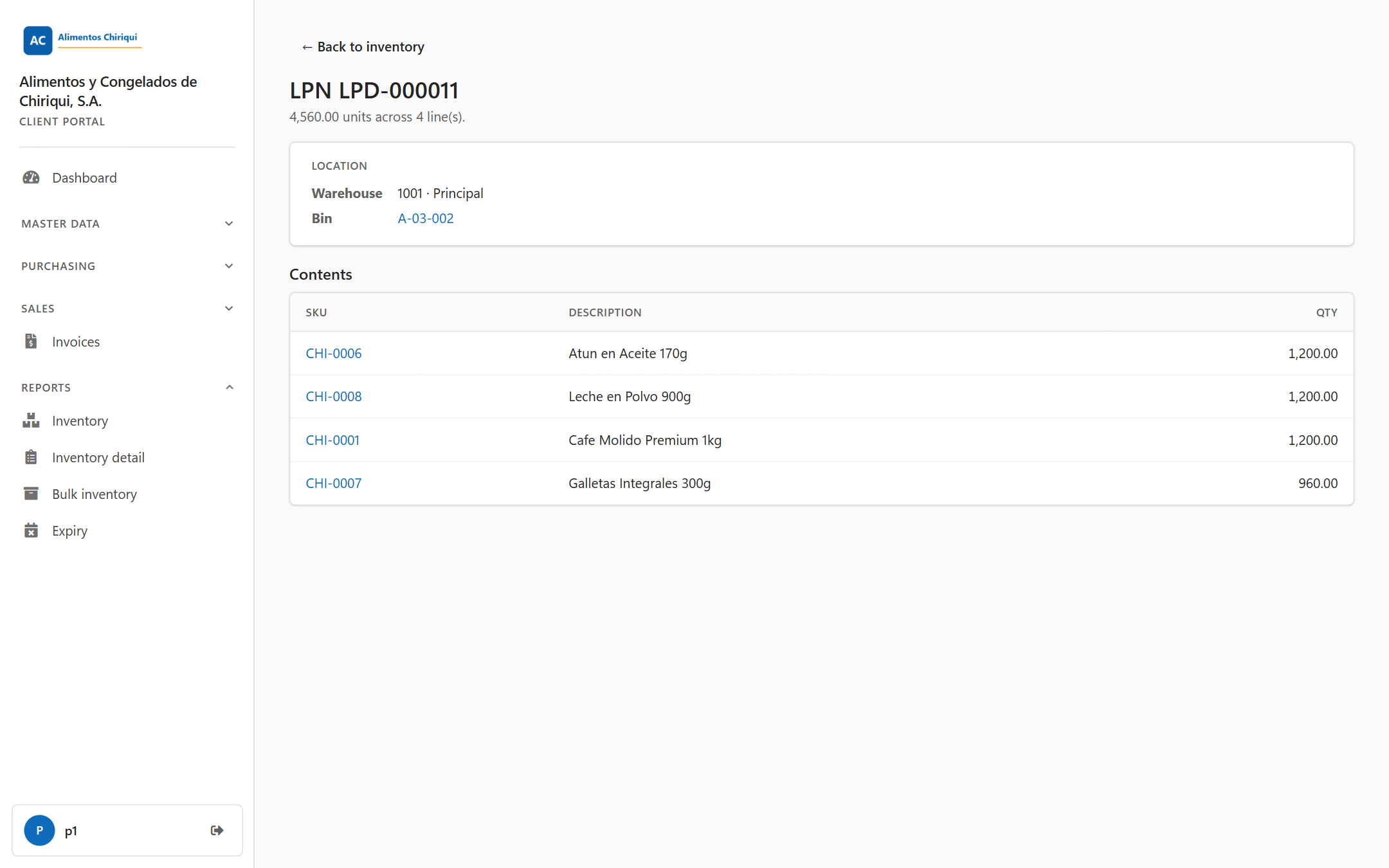
An LPN page.
| Field | What it means |
| Warehouse | The warehouse where the LPN is, shown as code and name, or a dash if it is not known. If the LPN is not in a bin yet, it is the LPN's own warehouse. |
| Bin | The bin the LPN is in. Click it to open the bin page. A dash means the LPN is not in a bin yet. |
| Column | What it means |
| SKU | The product's SKU. Click it to open the product page. |
| Description | The product description. |
| Qty | The quantity on hand, with two decimals, aligned to the right. |
There is one row for each stock line on the LPN.
| Message | Where | What it means and what to do |
| "Product not found." | Product page | The product does not exist or is not one of yours, or the address in your browser is not valid. Go back to the Inventory list and click the SKU again. |
| "Bin not found, or it holds none of your stock." | Bin page | The bin does not exist, it holds none of your stock, or the address is not valid. Go back to the Inventory list and click the bin again. |
| "License plate not found, or it holds none of your stock." | LPN page | The LPN does not exist, it holds none of your stock, or the address is not valid. Go back to the Inventory list and click the LPN again. |
| "No on-hand stock for this product." | Product page, On hand section | The product has no stock above 0 right now. |
| "You don't have access to this section." | Any of the three pages | Your user does not have the View Inventory switch. Ask your warehouse to turn it on. |
Was this page helpful?