Tenant Setup
Tenant Setup
Tenant Configuration consists of two tabs: 'General' and 'Login Screen'. On the 'General' tab, users can add and update basic information about their company and access the certificates and the license agreement.
General
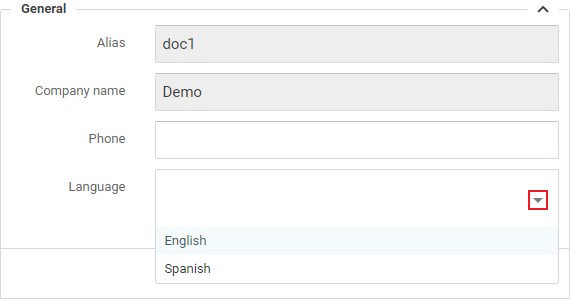
- The Alias and Company name are set by the implementation team and cannot be modified by the end user.
- Add your company's main phone number.
- Select a preferred language using the dropdown menu as shown above.
Address
Add or edit your company address in the section shown below.
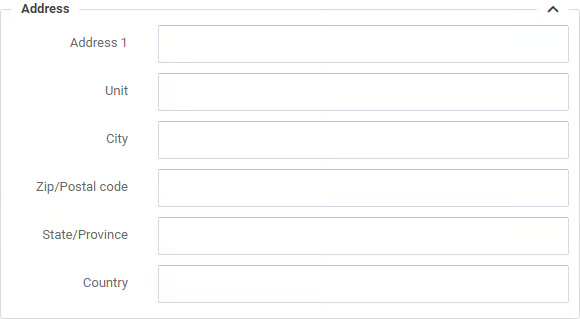
Complete all fields or your Packing Slips and Labels will have missing data.
License
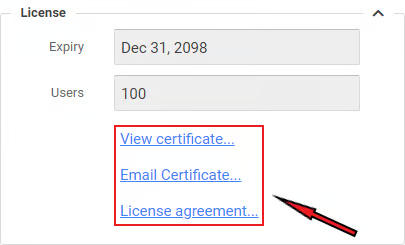
- The Expiry field indicates when your current P4W license expires.
- The Users field shows how many users can use the P4W system simultaneously.
- The links above allow the user to view and email the certificate, or access the license agreement.
Document Printing
P4W gives users the option to upload their own custom document for printing, including: custom Packing Slip, custom Commercial Invoice, custom Proforma Invoice, custom RMA, custom Receiving Receipt, custom 3PL Invoice. To upload a custom print document, click the 'Upload...' link and select a file from your local computer.
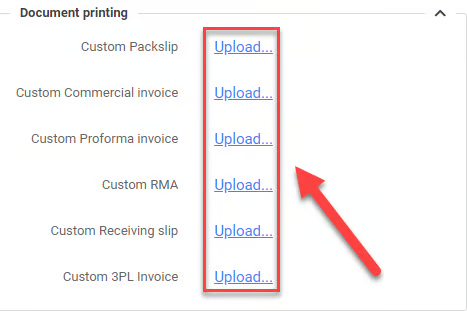
Notice: click the 'Update' button to save changes.
Was this page helpful?