 P4 Software
/
logisticaHQ-en
P4 Software
/
logisticaHQ-en
P4 Software
/
logisticaHQ-en
P4 Software
/
logisticaHQ-en
Enter the Cartonization Profile Setup, here you will create different profiles depending on the Compliance regulations of your client, or Small Parcel carrier. Example: FedEx has a 150lb weight limit per box.
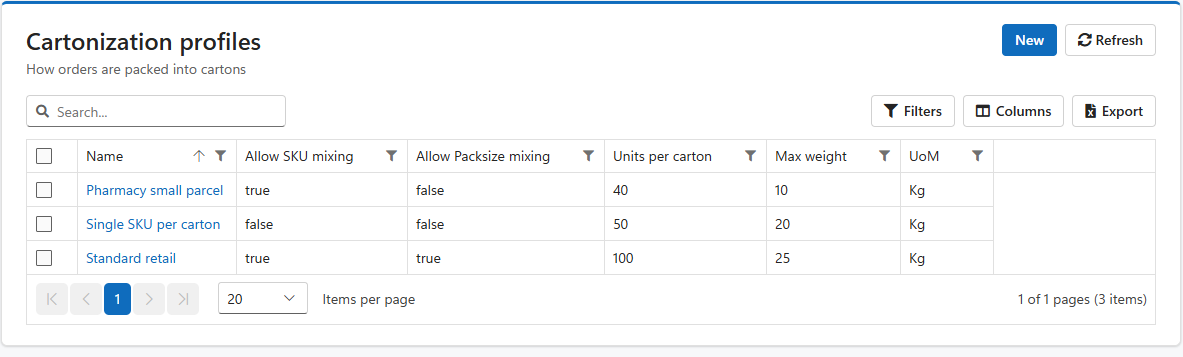
Click the New button to create a new profile.
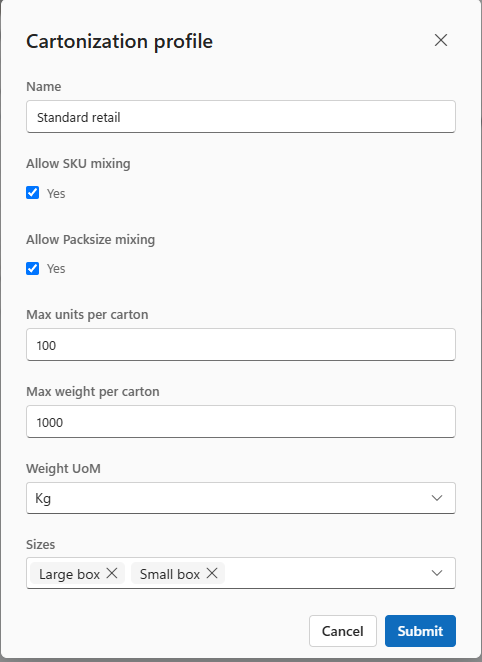
In this screen assign a name that you will understand, then complete the settings to create the profile to your specifications. Then click Submit to save your data.
Remember, in the Customer setup screen you will need to assign the correct Cartonization profile to the Customer.
Was this page helpful?