 P4 Software
/
logisticaHQ-en
P4 Software
/
logisticaHQ-en
P4 Software
/
logisticaHQ-en
P4 Software
/
logisticaHQ-en
LogisticaHQ backs up your company's database automatically every day and keeps each backup for 90 days. The Database backups screen lists those backups and lets you download any of them. You can keep your own copy off-site, restore your data on your own SQL Server, or connect reporting tools such as Power BI to a copy without touching the live system.
Open Setup > System > Database backups. The newest backup is at the top.
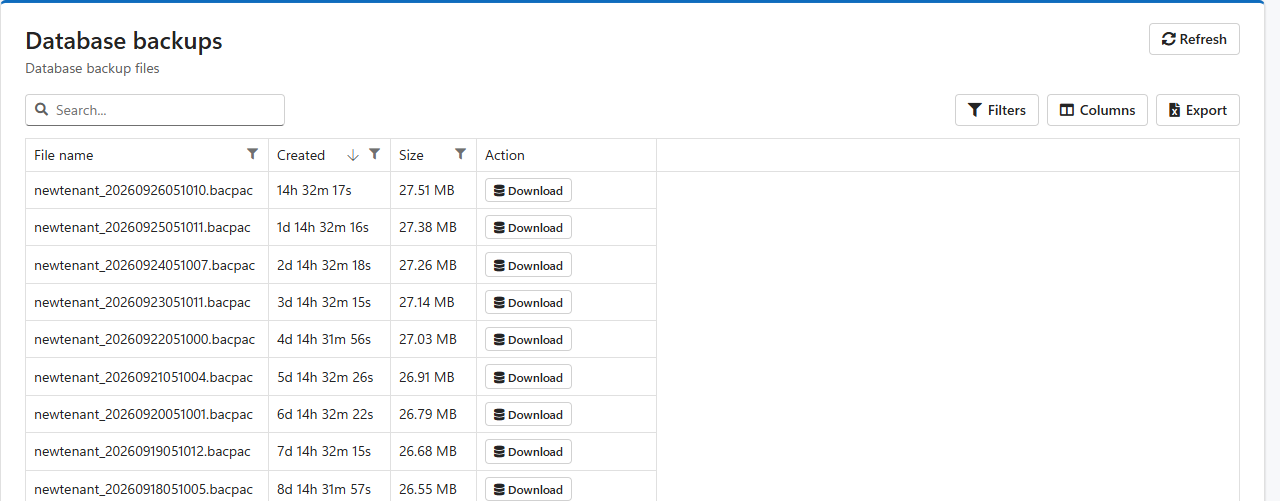
| Column | Meaning |
| File name | Your tenant's alias followed by the date and time the backup was taken, in UTC: newtenant_20260926051010.bacpac was taken on 26 September 2026 at 05:10:10 UTC. |
| Created | How long ago the backup was taken. |
| Size | The file size. |
| Action | Download saves the backup to your computer. |
A .bacpac file can be imported into Microsoft SQL Server 2008 R2 or newer, or into Azure SQL Database.
The restored database is a separate copy: nothing you do to it affects LogisticaHQ. Use it to run your own queries, build reports or connect Power BI. The Database query library has ready-made queries.
Keep downloaded backups safe. A backup holds all your company's data: products, customers, addresses, orders and user names. Store downloaded files where only authorised people can reach them, and delete copies you no longer need.
Was this page helpful?