 P4 Software
/
logisticaHQ-en
P4 Software
/
logisticaHQ-en
P4 Software
/
logisticaHQ-en
P4 Software
/
logisticaHQ-en
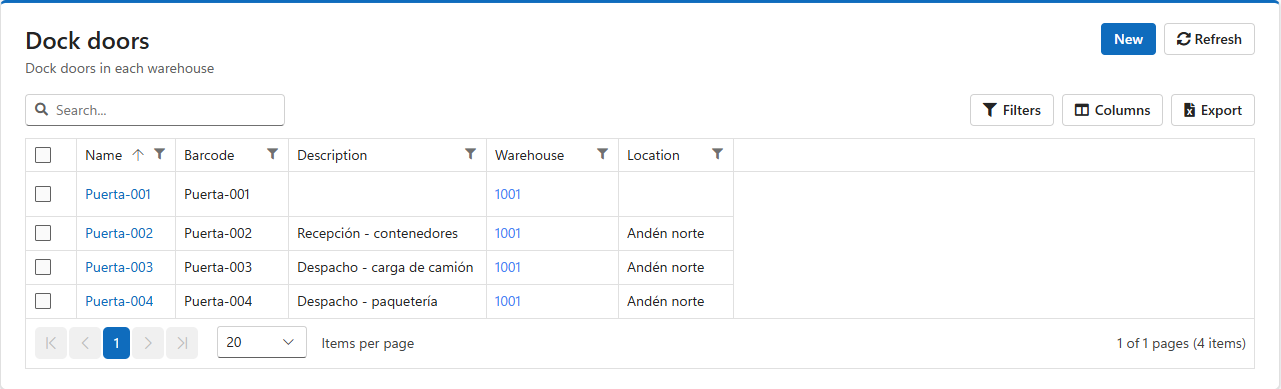
A dock door is a loading door of a warehouse. Giving each door a barcode lets operators stage pallets and totes at the right door and load the right truck: the handheld records exactly which door each shipment went to, and refuses a door that does not exist.
Open Setup > Warehouse > Dock doors.
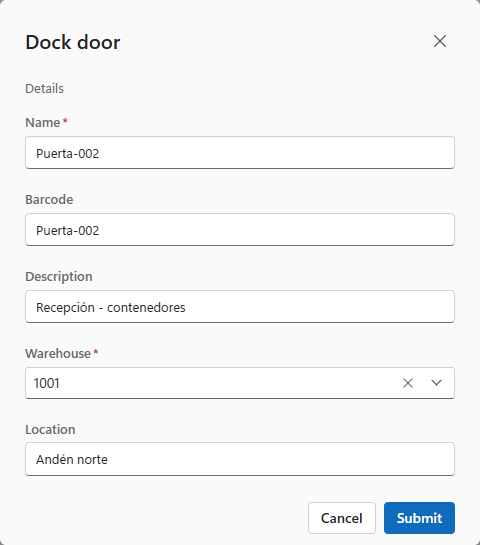
| Field | Use |
| Name | Required. How the door is shown on truck loads, orders and handhelds, for example Door 3. |
| Barcode | What operators scan to stage or load at this door. It is printed on the door label. |
| Description | What the door is used for, for example Receiving - containers or Shipping - parcel. Printed on the label. |
| Warehouse | Required. The warehouse the door belongs to. |
| Location | A note on where the door is, for example North dock. |
The handheld finds a door by its barcode or its name, so give every door a name and barcode no other door uses.
Tick the doors and click Print. Choose the printer and the number of copies. The label shows the door's name, barcode and description. Put each label where it is easy to scan from a forklift and cannot be confused with the next door's.
Tick the doors and click Delete, then confirm.
Was this page helpful?